Waypoints and Sharing
TomTom `/way` lines and sending routes to friends.
/way lines#
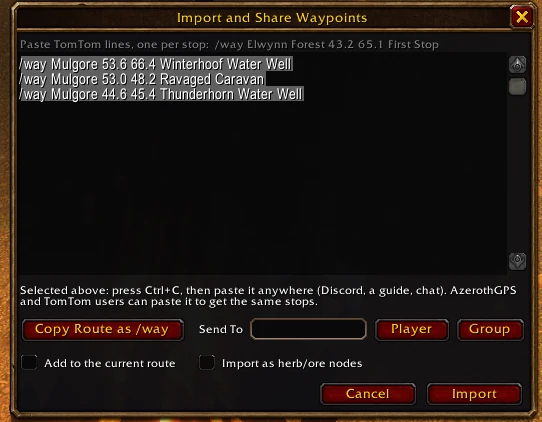
AzerothGPS reads the TomTom /way format that guides and websites use:
/way Elwynn Forest 43.2 65.1 First Stop (Vendor)
/way 45.0 60.2 Second Stop
- Paste them into chat (one line or a whole bunch), or into the Import and Share window (+ button). If you've got TomTom too, both addons get them.
- In the window, they can be herbs and ore or NPCs instead of stops: tick /way as herb/ore nodes or /way as NPCs before pressing Import. A line needs the node's or the NPC's name for that.
Map pins#
The map pin works just like the one on the game's world map, and it's the same pin, so it shows up on both:
- Ctrl + left-click anywhere on the map to drop the pin (a diamond) there. There's one pin at a time, so a new one moves it.
- Shift + left-click the pin to link it in chat as "[Map Pin Location]". If no chat box is open, one opens with the link in it.
- Ctrl + left-click the pin to take it away.
- Double-click the pin to make it a stop, like any other icon.
The pin stays put through reloads and logouts. It's just for you: it isn't one of your pins and never goes out with your map data.
Someone posted a map pin in chat? Click it and it becomes a stop. Shift-clicking it while you're typing just puts the link in your message, as usual. Don't want pins in chat turning into stops? Turn off Map pin links add stops (Options → Routing).
Sharing your map data#
Your herbs and ore, the NPCs you've talked to, your pins, and the roads and walls you've drawn can go to other players.
- Copy My Map Data in the + button's window (Import and Share) writes them as lines in the box, ready to copy (Ctrl+C). Tick what to include. Only your own finds go in: the herbs and ore you've gathered and the NPCs you've talked to, not ones you imported.
- To take someone's in, paste their lines into the same window and press Import. Herbs, ore and NPCs show as unconfirmed until you find them yourself. Roads and walls work for routes right away, and Undo takes them back. Pins shared in chat can be pasted in too, many at once (up to 5,000 lines a time).
- The window tells you what was added, what you had already, and which lines it couldn't read, with each line's number and why.
- It's only data. What you paste is read, never run, and it only goes into your own map, never into AzerothGPS's own data.
The lines look like this, one thing each:
H 0 2100.0,400.0 name=Peacebloom
O 1 -900.5,-4500.0 name=Copper Vein
N 0 2266.0,243.0 name=Innkeeper Renee <Innkeeper>
P add 0 1790000003 2250.5,230.0 icon=134400 name=Old Tree
R add 0 1790000001 2000.0,300.0 2010.0,300.0
Sharing your route#
- Copy route as /way to post your stops anywhere.
- Link To a player (type their name, or Shift+click them in chat) or your group. A short line goes in your chat box, "[AzerothGPS Route: 3 stops]", and nothing is sent until you press Enter, just like linking a map pin. Players without AzerothGPS only see that line. AzerothGPS users click it to get your next 8 stops, and they're asked before the route replaces theirs.
- In a group: a Share button sits on the directions panel (top right). It puts the route's link in party chat (raid chat in a raid) for you to send, the quest route too.
- Ask a group member for theirs: right-click their icon on the map. They're asked whether to send it, and you're asked before it replaces yours.
- Got a route link? Click it and AzerothGPS asks that player's addon for the route. Nothing comes in unless you click, so nobody can push a route or a popup at you mid-run. Turn off Accept routes shared by players (Options → Routing) to ignore route links altogether.