AzerothGPS changelog
What changed in each released version of AzerothGPS.
1.1.4#
Released October 4, 2026
New#
- Any size and shape, up to your whole screen. The map is still square by default, and its Size now goes up to your screen (a 4K one too), not 800. Options, General: tick Any shape and the Size slider splits into Height and Width, set separately, and dragging the map's corner sets them too, to any shape (a wide map on a wide screen, say).
Fixed#
- Zeppelin timers, timed again. 1.1.3 added a few seconds to every zeppelin's and boat's trip, which was right for Brill and Grom'gol but put others off (Orgrimmar and Brill's ran 4 seconds late each trip). Now each keeps its own trip time, Grom'gol and Brill's as timed in game, and every one waits at the dock the 62-63 seconds they really do.
Changed#
- Lighter on big maps. A big map zoomed out was placing every tile and icon again on every redraw, the same ones, even when it had hardly moved. Now they stay as drawn until the view really moves (and are refreshed a couple of times a second anyway), and a map over 800 across redraws at most 10 times a second. Routes and directions are unaffected.
- A wider direction window by default, so "Continue straight, then slight right in 180 yd" fits on one line. If you never resized it, it gets the new width; a size you chose stays.
1.1.3#
Released October 4, 2026
New#
- Starting towns' guards give you the whole town. Talk to a guard in Goldshire, Kharanos, Dolanaar, Brill, Bloodhoof Village or Razor Hill and every trainer, the inn and the stable master they know show on the map, as a capital's places do once you've talked to its guard. That includes the trainers they send you to outside town, named where they really are ("Sen'jin Village Mage Trainer"). Search finds them, for your faction's towns.
Fixed#
- Questions show over the map. "Don't use this zeppelin in routes?" and a route someone shares with you popped up in the middle of the screen; every AzerothGPS question now shows over the map while it's open (mid-screen only when the map is hidden).
- Zeppelin and boat timers no longer fall behind. The live server keeps each one at the dock about 2 seconds longer than the timetable had it, so a timer lost a few seconds every trip and was a minute or more off within the hour. Timed in game from Brill's tower; every zeppelin's and boat's timetable is corrected.
- Roads on Zephras Isle: 16 roads drawn in game, so routes there follow them.
1.1.2#
Released October 4, 2026
Fixed#
- Zeppelin and boat timers stay right. Coming in to the far dock, a ride was taken for that dock's departure, so every ride moved its timer on by the wait there, and it kept needing to be put right. Now the ride's arrival is just that, and the time each ride really takes is learned from your rides and used in place of the estimate (the "arrives in" on board too). Timers saved by earlier versions are cleared once: a dock shows its times again after your next ride on it.
- Group members who log out leave the map. A party or raid member who went offline stayed on the map where they logged out; now their icon goes. In a raid, pointing at an icon says "Raid member".
1.1.1#
Released October 3, 2026
For WoW Forever client 1.60.1 (interface 16001), build 70205: the map data (caves, dungeons and raids, building interiors, points of interest, terrain) is updated for it.
New#
- Search finds your pins and city places. Your pins show up with where they are ("Auction House Stormwind City"), and so do the city places you know from the guards, for your faction's capitals ("Inn Ironforge"). Pick one and it's a stop there, on the right floor. Older pins work too: where they are is worked out the first time you search. A pin made where you're standing also remembers whether you were indoors and the subzone, for telling floors apart later.
- Search by several words: "Inn Ir" finds Ironforge's inn, "auction iron" your Ironforge auction house pin. Each word just has to start a word of the place's name or where it is.
- Turn off a zeppelin, boat or the tram for good. Right-click its dock on the map, Don't Use, and routes never take it until you turn it back on (right-click again, Use It). It stays on the map, faded. Options → Routing has a Zeppelins, boats and the tram section listing each one your faction can take, by kind, all on by default. The Deeprun Tram's two ends have dock icons now too.
Changed#
- Resize the map from its corner, on by default. Drag the map window's bottom-right corner to make it bigger or smaller. The option is now Resize from the corner (Options → General, under the Size slider), on for everyone, including if you had 1.1.0's "Lock map size" on. While Lock map position is on, the corner doesn't resize either; unlock the map and it does again.
Fixed#
- A road drawn in game on the Eastern Kingdoms.
- Route links in a raid or dungeon: when several people clicked your route link at once inside an instance, the game's limit on addon messages could cut the end off their routes. AzerothGPS now paces what it sends to stay under that limit and resends anything the game refuses, so everyone gets the whole route.
1.1.0#
Released October 2, 2026
For WoW Forever client 1.60.1 (interface 16001). This one brings new data files, so restart the game fully after updating instead of just doing a /reload.
New#
Getting there
- Joining the road where it's heading. Off the road, a route now joins it where you're going (across open ground, around fences and buildings), not back at the closest bit and round. Wander off the line and it's worked out again from where you are, so the join point moves with you. A short hop over open ground just goes straight. This replaces the old experimental off-road shortcuts, and their option is gone.
- Buildings are in the way now. Routes go around buildings (Goldshire's inn, farmhouses, towers) instead of through them. A stop inside one, like an innkeeper, is still reached.
- Lifts. Routes ride the Great Lift between the Barrens and Thousand Needles, Freewind Post's lift and Gnomeregan's, and the directions say "Take the lift down" (or up), like Thunder Bluff's and Undercity's.
- Stairs in the directions. In the capitals, Undercity and dungeons, the directions call out the stairs and ramps between levels, with the turn after them: "Stairs up in 10 yd, then turn left". The bends of a spiral stair don't count as turns.
- Flight paths to pick up on the way. When your walk passes a flight master of your faction you haven't learned, a brown line shows the little detour and the steps mention it ("Detour 388 yd to learn the flight path at Tarren Mill"). Right-click the flight master's icon, Remove?, to skip it.
- Leave a ride out. Every flight, boat, zeppelin, tram and teleport a route takes has its icon where you board it. Right-click it, Remove?, and the route is worked out without it, and stays that way for this route (rerouting and /reload too). For a flight, each flight master it passes over has its own icon, so you can drop just one hop. If leaving rides out means there's no way there at all, you'll see Route not possible without that ride, with the option to put it back.
- Hearth or teleport from the directions. When a route starts with your hearthstone or a teleport, a button with its icon sits in the directions panel and glows in the arrow window, right where the arrow usually is. Your click uses it; nothing ever gets used without one, and it hides in combat. New teleports: the engineers' Dimensional Ripper - Everlook and Ultrasafe Transporter: Gadgetzan. One is only suggested when it saves more than 800 yd.
- The Deeprun Tram between Stormwind and Ironforge, for Alliance characters.
- Movement abilities in travel times. Ghost Wolf, Travel Form, Cat Form with Feline Swiftness, and Aspect of the Cheetah or the Pack count in travel times, and become the walking time while they're on. The panel shows your walking time and your fastest other way to travel: a movement ability, or your mount once you can ride (faster with journeyman riding).
- Undercity, floor by floor. Routes follow every floor (walkways over the bank's level, the canal walks under the bridges, the Magic Quarter's rooms), picked by your height and the stop's. Trips across town are shorter and no longer cut through floors, over the canals' rims or out over the Ruins' walls.
- A route to another continent is shown on the world map first, then the map follows you again.
- City places a guard showed you can be double-clicked into stops, and a stop down in a city takes the lift.
- More roads on Eastern Kingdoms, drawn in game.
- While a route is being worked out, now and then a Murloc does the thinking (Mrglglglgl), or the gnome engineers ("Spinning up the Route-o-Tron 3000...") or a goblin ("Time is money, friend! Routing...").
Dungeons and raids
- Wings get their own icons. Scarlet Monastery's Graveyard, Library, Armory and Cathedral, Dire Maul's East, West and North, Stratholme's Main Gate and Service Entrance, and Maraudon's Orange and Purple each have an icon, named so you know which door is which. A wing's map shows just its bosses, its usual way through from its own door, and its own boss route; inside, the map goes with the wing you walked in through. Maraudon's inner bosses belong to both sides. Uldaman's back way in and Gnomeregan's Train Depot get named icons too, and show the whole dungeon.
- Mark where you are in a dungeon. The game hides your position inside, so double-click the dungeon's map where you are and your class icon goes there (right-click it to clear). The panel at the top shows the controls, with right-click a boss to mark it defeated.
- A stop picked in a dungeon's map (a spot, a boss or a pin) goes on the dungeon's entrance out in the world, since that's where you're actually heading.
- Blackwing Lair (through Upper Blackrock Spire) and WoW Forever's own dungeons and raids: their maps, bosses and entrances. Entrances we don't know yet are learned when you go in; share them with Copy Map Data....
- Cave and mine entrances on the map (double-click one for a stop), in the map menu's new Caves/Dungeons/Raids group.
- The Defias Hideout under Moonbrook has its roads, down the spiral stairs and the ramps to the Deadmines' door, and the dungeon's entrance shows on its map. A route to the Deadmines from outside takes you to the Hideout's way in, and its map shows the way down from there.
The map
- Pins. Shift + left-click the map, Create Pin, give it a name and any icon in the game (the same list a macro uses). Where floors stack up (a dungeon, Undercity, a cave), pick its floor too. Double-click a pin for a stop, right-click to remove it. Pins are kept for all your characters and can go out with your map data. Options → Tools: Pinning; Options → Map: Pins.
- A bigger map shows more. Resizing the window keeps the scale, so you see more of the world instead of the same bit bigger, and past 450 wide you can zoom out further too.
- Resize from the corner. Turn off Lock map size (Options → General, under the Size slider) and drag the map window's bottom-right corner to make it bigger or smaller.
- On a zeppelin or boat, like on a flight: once AzerothGPS sees it leave the dock, the panel and the arrow say "Riding the zeppelin to Brill, arrives in 1m 15s", counting down by its timetable, with the walk on from the other dock after it (it used to keep showing the way to the zeppelin you were already on).
- Share a zeppelin's or boat's times. Shift + left-click its dock (or the route's ride icon there) once AzerothGPS knows its timetable, and a line like "Zeppelin from Brill to Grom'gol Base Camp: arrives in 2:10, leaves in 3:10" goes in your chat box for you to send.
- Map pins, as on the game's world map. Ctrl + left-click the map to drop the map pin (a diamond, the game's own waypoint), Shift + left-click it to link it in chat, Ctrl + left-click it again to remove it. It stays through reloads and logouts and isn't shared with your map data. Click a map pin someone posted in chat ("[Map Pin Location]") and it's a stop (Options → Routing: Map pin links add stops).
- Your group on the map, as round class icons in their class color (Options → Map, Party members). They don't need AzerothGPS themselves.
- Heading-up: with "Turn the map with me" on, your arrow sits low on the map, so more of the road ahead shows.
- Right-click inside a building shows the outside first; the next right-click, the continent's map.
- Right-click in Undercity or Ironforge shows the terrain around the city, zoomed out, and you can drag and zoom it anywhere (it used to jump to the continent's map, and the land past the city stayed black). Recenter for the city's map again.
- The capitals' districts are named on the map when zoomed in, like Undercity's: Stormwind's Trade District and Old Town, Orgrimmar's Valleys and The Drag, Ironforge's Wards, Thunder Bluff's Rises, Darnassus's Terraces.
- Zephras Isle on the world map, as a framed picture at the top; click it to open the island. On a continent's map, the zone under your pointer lights up.
Settings and sharing
- Performance options (Options → Performance) for older PCs, with a live readout of how much time AzerothGPS is taking:
- Map redraws per second (5 to 30, default 20), the biggest saving: at 10 the map needs about half the work.
- Work out a route you've left at most every 2 to 10 seconds.
- Stops routed and drawn ahead (1 to 8, default 3). Every stop keeps its marker and its place in the fastest order; the ones further on show an estimated distance until they're routed.
- Gentle background work: fewer stutters, routes take a moment longer to appear.
- Turn the arrow every frame, or 20 times a second.
- Use Low-End Settings turns them all down at once; Restore Defaults puts them back.
- Pick what Copy Map Data... includes: Roads, Walls, Routes and Pins, each with how many you've got, all ticked unless you untick one. Routes are the ways you went when you beat the estimate, kept as you play (on your PC). Dungeon entrances you found always go along. The old Share drawn roads and walls and Share faster trips options are gone; these checkboxes decide now.
- New defaults: the map is 450 wide, Quest Route and Use Hearthstone live in the map button's menu, and in combat the map stays shown, fully opaque and clickable (Options → Opacity). Your own settings stay as they are; Reset to defaults takes these.
- Road and wall tools: the road tools show the road network while they're on, "Show extracted roads" and "Show extracted walls" are one button now (Show Roads and Walls, under Undo), and Undo takes back your last road or wall change, whichever came last.
- Fixing floors over floors (Undercity, under Orgrimmar's Drag and Stormwind's bridges, caves and mines): with the road or wall tools on, Shift + mouse wheel picks the floor you're editing. The hint under the map says which one ("Editing: floor 2 of 3 here"), and what you draw or erase changes only that floor.
- For other addons: API versions 3 to 12 (HoldMap with a map style held while it's on, icons in overlays, popup windows in AzerothGPS's style, Shift-click on a dungeon boss handed to another addon (OnIconShiftClick), LookAt, Follow, ShowMap, ShowWorld, ToContinent, SaveView and RestoreView, TopPanelInset). See docs/api.md.
Changed#
- Sharing a route in game is a link now. "Link To" a player or your group (Import and share waypoints) puts a short line in the chat box, "[AzerothGPS Route: 3 stops]", for you to send like a map pin. Players without AzerothGPS only see that line. AzerothGPS users click it to get your route, and are still asked before it replaces theirs. Nothing arrives unless you click a link, so no more surprise popups in the middle of a run.
- Zones way above your level: "Keep this route?" now comes before the route is drawn or followed, and it's asked again if you leave a ride out and the new way runs through one. A quicker safe way, like the tram, always comes first.
- No more straight lines over mountains. When there's genuinely no way to walk somewhere (no roads join up and a wall or a mountain's in the way), you get "No way there found" instead of a line over the top. Across open ground or water, a straight line still counts.
- Flights at a low level are weighed against the walk as it's really routed, so you'll fly when walking would go the long way round zones too high for you (like Brill into Arathi Highlands at level 14).
- The directions say what to do now and then the next turn: "Continue straight, then slight right in 13 yd" ("Slight right now" at the turn).
- In Ironforge and Undercity the city's own map stays up while you're in town, wherever you pan or drag, and zooming out stops at the city. Right-click for the outside. Coming into town zoomed way out, the map zooms in to it.
- With the window frame on, the place you're in ("Undercity") is in the title bar instead of "AzerothGPS"; the coordinates stay at the bottom.
- Every popup (Create Pin, Your Map Data, the waypoint windows) has the map window's frame now, and the yes/no questions have it without a title bar.
- Changing a route option (flight paths, the hearthstone, teleports, the zones or towns avoided) works the trip out again right away.
- A shaman with Astral Recall ready gets that instead of the hearthstone (same trip home), so the hearthstone stays ready for later.
- "Route there anyway?" is remembered for the route, even after a /reload.
- The last stop clears as soon as you reach it.
- With a stop down in Undercity, only the city's stops keep the order you placed them; the rest go in the fastest order.
- The map window sits under other windows.
Fixed#
- Zeppelin and boat timers after a server restart: riding one again resets its timer, and the restart's shift no longer bends the timetable for the rides after.
- Brill to Grom'gol takes the direct zeppelin again, not two zeppelins by way of Durotar. Zeppelin and boat times now come from the server's timetable.
- The bat out of Undercity: while it flies you through the city and its sewers, the route is the flight ("Flying to The Sepulcher, lands in..."), not a walk back to the flight master that kept getting longer.
- Lag: the first route after a /reload and very long walks are worked out in the background (no more freeze); recalculating a route with a flight in it; riding a zeppelin or boat no longer reworks the whole route; the first road display after a /reload, and each road or wall edit.
- The capitals' roads are their streets now. Stormwind's (and Ironforge's, Orgrimmar's, Thunder Bluff's and Darnassus's) roads were a jumble over every floor, some running out over the water. They now follow the streets the guards walk, with ways to every trainer, bank, inn and flight master.
- In the capitals, routes no longer climb onto a ledge or balcony and jump back down to a trainer underneath (Ironforge's Mystic Ward and Hall of Mysteries).
- Talking to a guard in Stormwind, Ironforge or Darnassus only showed the place you asked for; now all of that city's places show, like in the Horde capitals.
- In Ironforge, routes cut straight across the Great Forge and the Forlorn Cavern's pool instead of following the halls.
- Thunder Bluff's lifts: routes into and out of the city take them now, and two ways out that ran straight down the mesa's cliff are gone.
- Routes out of Stormwind went straight through the city wall: a road drawn in through its gate went missing once it was in the data. Drawn roads always stay now.
- Dungeon routes jump between floors much less: 16 of the boss routes that used to are fixed.
- On a road, routes keep to it unless a cross-country way onto another road saves a fair bit (on Mulgore's road the route kept flipping between the road and a shortcut).
- While riding or walking past ground the addon was still checking, the route vanished every few seconds behind "Working out the route...". It stays up now while it's reworked.
- When a route started with your hearthstone, the direction arrow gave the turns of the walk after it. It now says "Use your Hearthstone" like the route's first step, with the button.
- Stormwind's map flipped between the city's own map and the terrain as you zoomed; Stormwind keeps the terrain map now.
- A route out of Ironforge zoomed its overview out over the city's map into the black; it shows the land around now.
- The map stayed on Ironforge's outside after making or canceling a route out of the city.
- The map's title says the city you're in (Ironforge, not Dun Morogh), and it's centered.
- The corner logo stands on its own without the circle, and it's sharp.
- City places, pins, stops made from them and party members' class icons looked grainy; they're drawn at a size the game shrinks cleanly now, and sharp. Place names and city labels on the map are crisp too (they sat between screen pixels and looked smeared).
- The Deeprun Tram's map was blank.
- A zeppelin to Zephras Isle had no line on the map.
- A dock that was a stop lost its countdown.
- A straight line over the hills could replace the roads after standing still for a while.
- A flight could stop being suggested after adding a stop elsewhere and taking it back.
- Roads vanished from the map when zoomed out (road and wall tools).
- Ironforge's roads, and road tool edits there, didn't show on the city's map.
- Clicking the open sea on a continent's map opened a black terrain view.
- The "lands in" countdown on a flight stayed stuck at the flight's full time, and flight times were never learned. It counts down now, along the flight's path through any stops, which the map draws too.
- A character that knew no flight paths yet got no detour to learn one it walked past.
- A stop in the other faction's town (Dun Garok, from Tarren Mill) was reached by a straight walk over the hills instead of the road in: the guards of the town you're heading to (or leaving) no longer push the route off the road. Passing other towns still bends the route around them.
- A boss's kill sometimes didn't count, so the boss route kept sending you back to it (no kill reported by the server). A boss you see dead, targeted, moused over or looted, counts now, and where the game hides who died, right-click a boss on the dungeon's map to mark it defeated (or not).
- Right after logging in (a new character above all), your flight paths and faction could be saved under "Unknown" instead of your character.
Known limits#
- Party members show only where the game gives their position, so not inside dungeons.
- In some dungeons with floors stacked on floors (Blackrock Spire and Depths, Temple of Ahn'Qiraj, Scholomance) the gold line can still jump between floors in places.
- Zeppelin and boat countdowns start once you've ridden that one, since the game doesn't tell addons where they are.
1.0.7#
Released September 28, 2026
For WoW Forever client 1.60.1 (interface 16001). New data and image files are included, so fully restart the game after updating, rather than just /reload.
New#
-
Dungeons and raids: 25 of them (from Ragefire Chasm to Naxxramas) have entrance icons on every map style (the map menu's "Dungeons and raids" group turns them on and off). Click one for its map:
- the game's own map of it, floor by floor with the + and - buttons at the top left (the mouse wheel still zooms);
- its bosses, numbered in the usual kill order (optional ones marked);
- a gold line for the usual way through, boss by boss, with stairs icons where it goes up or down a floor.
Right-click goes back to the map you came from.
-
Boss route (map menu): a route through a dungeon's bosses in the usual order. Each stop is done when its boss dies, not when you get there, and a boss already down is left out.
-
Inside a dungeon the game hides your position from addons, so the map shows the dungeon itself: the bosses you've killed fade, the stretch of the gold line to the next boss lights up, and the panel says which boss is next ("Next: Sneed (2 of 6)").
-
Zones too high for your level (Options → Routing, on by default): routes go around zones whose levels are red for you, when there's another way. Routing to a stop in one, or along the only way there through one, asks first, on the map.
-
Zeppelin and boat docks show on the map with points of interest (double-click one for a stop). After you've ridden one once, its icon counts down to its next arrival, from its timetable and when you saw it leave.
-
Boats, zeppelins, lifts and dungeon portals are only used when your faction can take them.
-
City icons on the terrain view: Undercity's and Ironforge's open their inside maps.
-
For other addons: a public
AzerothGPSAPI (map geometry, the point under the mouse, drawing on the map; dungeons' maps too). See docs/api.md.
Fixed#
- Long routes without flight paths froze the game for seconds (off-road shortcuts are now worked out in the background).
- A route could turn back to a road the other way (a U-turn) while the way around a rock or a steep patch was still being searched, and kept doing it as you walked.
- Right-clicking out of a city's or dungeon's map went to the wrong place.
- An error inside dungeons (a tooltip the game hides from addons).
Known limits#
- Blackwing Lair and WoW Forever's new dungeons and raids aren't in yet.
- In some dungeons with floors over floors (Blackrock Spire and Depths, Temple of Ahn'Qiraj) the gold line can still jump between floors in places.
- Zeppelin and boat countdowns start once you've ridden that one (the game doesn't tell addons where they are).
1.0.6#
Released September 28, 2026
For WoW Forever client 1.60.1 (interface 16001). New data files are included, so fully restart the game after updating, rather than just /reload.
New#
-
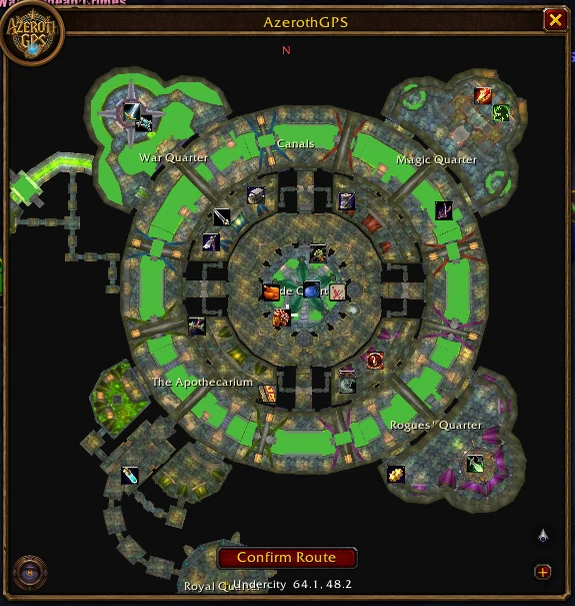
Undercity: routes follow the city's own floors, stairs and lifts, with "above you" and "below you" hints, and use a safe jump down a ledge when it saves time (only when your health allows it). Off-road shortcuts turn themselves off in cities and the Ruins of Lordaeron, and back on after. Its flight master, trainers and quest givers are reached down in the city, not up top.
-
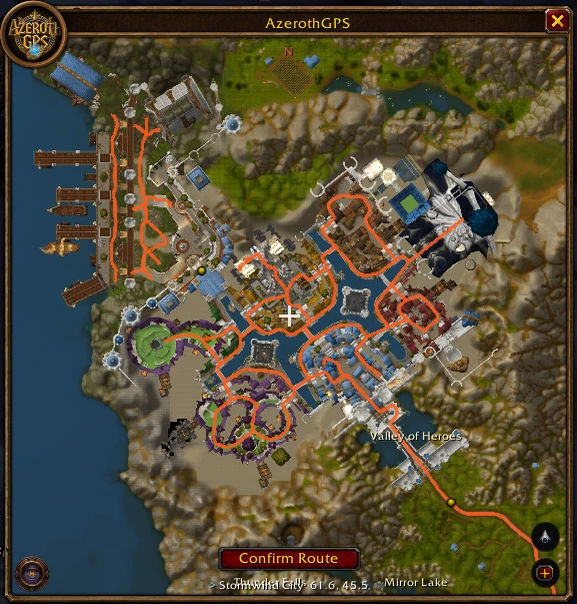
The capitals: Orgrimmar, Ironforge, Stormwind, Thunder Bluff and Darnassus have their own streets now: routes go in through the gates and follow them to the banks, trainers, flight masters and docks. That includes the Cleft of Shadow under Orgrimmar, the halls under Ironforge's mountain, Stormwind's canal bridges, and Thunder Bluff's bridges and elevators. Off-road shortcuts turn themselves off inside.
-
Caves and mines: 351 of them on both continents are mapped: routes go in at the mouth and follow the tunnels.
-
More roads: many roads the map was missing (Dun Morogh, Desolace, Badlands, Winterspring and more) are part of the network now.
-
The other faction's towns: routes keep away from their guards and go around their towns when there's a way (Options → Routing).
-
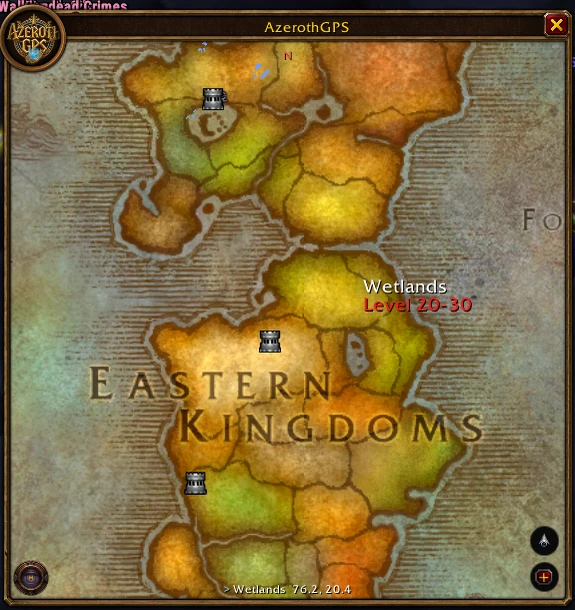
Continent map: right-click from the terrain view goes to the continent's map, then the world map. Hover a zone for its name and level range; click a capital's icon to open the city (Ironforge and Undercity show their inside).
-
City locations: after talking to a guard in a capital, its banks, trainers and other places show on the map. Asking a guard again routes there again, and any banker, auctioneer or trainer of the kind finishes that stop.
-
Quick buttons are grouped (map styles; quests; herbs, ore and farming) and slide out beside their button, in the order you set in Options.
-
Road tools (Options → Road tools): draw a road the routes miss, or erase a false one (or circle an area).
-
Wall tools (Options → Wall tools): draw walls routes can't walk through (roads crossing them are cut; leave a gap for a gate), or erase a mountain edge the map has wrong. Show extracted walls draws everything routes won't cross.
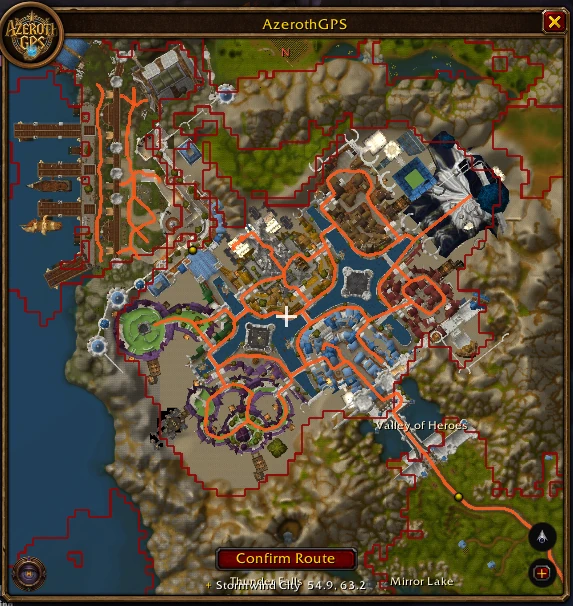
-
Share your fixes: Options → Help improve → Copy map data..., then paste it in a Road data issue on GitHub.
-
Quest route: an option to use only the quests in the zone you're in; a quest route always goes in the fastest order, in cities too.
-
Smoother directions: short jogs in a route are straightened (not on hilly ground, where winding is the way up), and a turn that just jogs back onto the same line reads as straight on. Parts of a route on another floor are drawn faint and dotted.
-
The map keeps where you panned it across a /reload, and switching map style keeps the spot you're looking at.
Fixed#
- Routes through walls, off ledges and into water in Undercity and the Ruins of Lordaeron.
- A freeze when the first route after logging in was worked out, and the road network builds several times faster.
- "Turn around" when the way on was a lift down or up.
1.0.5#
Released September 27, 2026
For WoW Forever client 1.60.1 (interface 16001). A new key binding file is included, so fully restart the game after updating, rather than just /reload.
New#
- Questing (on by default, Options → Routing). A stop inside a quest's area is done when that quest's objectives are, not when you get there:
- In the stop's quest area, the arrow window shows the objective counters. A smaller arrow still points to the stop's spot, with "In quest area" and the distance under it, and the stop after this one listed below.
- At the spot, a big ! replaces the arrow and the route waits while you quest. Leave the area early and the route leads you back.
- Objectives done anywhere in the area: on to the next stop.
- Other quest areas you walk through (even with no route) show their objectives in the arrow window, with a !.
- In the area of a stop further down your list? That stop moves to the front.
- Quest route. The new Sprint button next to the Hearthstone button makes a route through your quest log: every quest's objectives and every finished quest's turn-in, in the fastest order.
- Pick up a new quest while on a quest route and a Sprint icon pulses in the arrow window's corner. Click it to make the route again with the new quest.
- Corpse runs. Released as a ghost, your body (the skull marker) becomes stop 1 with a red route, ahead of any stops you had. Once you're alive, it's taken off and your route carries on.
- Long lists. Import up to 100 stops (a quest guide, say). With fastest order on, the whole list is ordered from where you are; the route shows the next 8 stops and brings in the next one as you arrive.
- Show/hide key. Set a key for the map in Options → General, or in the game's Key Bindings under AddOns ("Show/Hide AzerothGPS").
- Reopen following me (Options → General, off by default): with a route set, a map you hid while looking around reopens centered on you.
Improved#
- Quest areas are found more reliably:
- Small areas (a few dozen yards) are found by looking closely around you.
- Quests with no map icon on your current map are traced too.
- Tracing waits until combat is over (the game hides the answers in combat), so areas no longer come out empty.
- All of it works with the map closed.
- Hidden map: routing and the arrow keep going with the map closed. Stops placed but not confirmed are confirmed when you close it.
- The direction arrow is click-through while locked.
- The route animation frames every stop, not just the first few.
Fixed#
- The route animation could stop the map from updating after making a quest route.
1.0.4#
Released September 27, 2026
For WoW Forever client 1.60.1 (interface 16001). A new texture is included, so fully restart the game after updating, rather than just /reload.
Improved#
- Much lower CPU use. In testing with a 5-stop off-road route and quest areas shown, AzerothGPS uses about 40% less CPU than 1.0.3, with far fewer frame hitches:
- Routing no longer recalculates several times a second while you're off-road. Background terrain searches refresh the route at most every 3 seconds.
- Recalculations are cheaper. Terrain checks and stop-to-stop times are remembered instead of worked out again.
- Multi-stop routes work out the legs between stops one per frame, so adding stops no longer stalls the game.
- The map redraws at most 20 times a second, and dotted route lines are drawn as one line per leg.
- The first route after logging in builds its road data in the background (the route panel briefly says "Working out the route...") instead of freezing the game for a moment.
- Hearthstone and teleports on any leg. On a multi-stop trip, your Hearthstone (or Astral Recall, or a mage teleport) is now used on the leg where it saves the most time, not only from where you stand. A trip that ends near home hearths from the last stop instead of running back. Each is used once per trip.
Fixed#
- Routes stay up to date while the map is hidden (for example in combat). The direction arrow keeps the route's background work going.
1.0.3#
Released September 27, 2026
For WoW Forever client 1.60.1 (interface 16001). New files are included, so fully restart the game after updating, rather than just /reload.
New#
- Search. The magnifier at the bottom-left of the map finds towns, zones, landmarks, flight masters and boat and zeppelin docks. Pick one and it becomes a stop. NPCs can't be searched: the game doesn't tell addons where they are.
- Farming routes. Open the round map button, choose Draw a farming area, and drag around the herbs or ore you want. The route loops through every known node inside, round and round.
- Herbs and ore:
- Separate layers: Herbs and Ore are now separate map layers, and a farming area uses the ones you show.
- Right-click to save: right-click a herb or ore node without the profession ("Requires Herbalism/Mining") and it's saved for your characters who have it.
- Import node lists: in the waypoint window (+), choose "Import as herb/ore nodes". They show faded until you gather there.
- Hearthstone and teleports. When it's faster, a route can start with your Hearthstone, Astral Recall, a mage's teleport or Teleport: Moonglade. The directions say "Use your Hearthstone (to …)"; the addon never uses anything for you.
- Two options under Routing: "Use hearthstone" and "Use class teleports" (both on by default).
- Hearthstone button next to the round map button: one click turns the hearthstone on or off for routes (grayed when off).
- Knows your inn: the hearthstone lands at your inn's building, and the exact spot is learned when you're inside it.
- New flight masters on the way. If a flight master of your faction you haven't learned yet has a flight to one you know, and going there is faster, the route says "Learn the flight path, then take the flight to …".
- Zephras Isle. WoW Forever's island has its terrain map, roads and place names, and routes take the zeppelins there from Alterac Mountains and Mulgore.
- Click-through. Options → Opacity: while moving and/or in combat, clicks pass through the map and the arrow to the game world (combat on by default).
Improved#
- Off-road routes:
- They walk around ridges on longer trips (up to 3,000 yards) instead of making long road detours.
- They walk off rocks you're standing on.
- They no longer cut through cliffs from walled-in spots.
- Checked with a new all-zones route test: 0 bad routes in 711 random trips.
- Route options apply right away. Turning flights, the hearthstone or teleports on or off changes the route at once, instead of keeping the old one for a while.
- Quest areas:
- Much lower CPU use while moving with quest areas shown.
- They no longer disappear for a while when an outline is updated or you cross into another zone.
- Gathering is recognized at every rank of Mining and Herb Gathering, so gathered nodes show up.
- Adding a stop to a route shows the whole route again after 5 seconds, then follows you. Drawing a farming area plays the route animation.
- The map menu closes after 6 idle seconds or a click on the map, and the search panel after 20 seconds.
- Stop markers skip the cross and skull, and start over after six.
- Buttons: the import + button and the back-to-you button swapped places.
- The direction arrow has no tooltip anymore. How it works is explained under Options → Directions.
- Close buttons on AzerothGPS windows work in combat.
- The addon list shows the AzerothGPS icon instead of a "?".
Fixed#
- Hearthstone wasn't suggested in routes.
- Flights with only one known flight master at the far end couldn't be used.
Removed#
- Quests to pick up. This client only shows them on its own minimap, where addons can't read them.
1.0.2#
Released September 27, 2026
For WoW Forever client 1.60.1 (interface 16001). Extract the AzerothGPS folder into World of Warcraft\_classic_beta_\Interface\AddOns. New image files are included, so fully restart the game after updating (not just /reload).
New#
- Flight paths: routes take flights between the flight masters your character knows, including connecting flights (option "Use flight paths", on by default). Open the flight map at any flight master once so the addon learns which ones you know.
- Flying: while on a flight, the route stays put and nothing is recalculated. The flight's line shrinks as you fly, and the time left counts into your ETA.
- Stop order on the way: with "Visit stops in the fastest order", stops are reordered as you travel when another order becomes clearly faster.
- Fade while moving: the map can fade while you move, leaving the route, the stop markers and your arrow visible (Options → Opacity).
- Window frame: the map has a game-style frame with a title bar, logo and close button, and it's its own option. The map and the direction arrow have separate lock options.
- Options: the options window has pages like the game's settings (General, Map, Routing, Directions, Opacity, Road tools, Help improve).
- Map menu: one round button at the bottom-left opens the map type and the map layers.
- Route panel: a -/+ button collapses the steps to the trip's times. The ✕ now closes the panel without canceling the route; an option restores the old behavior.
Improved#
- Off-road: routes join and leave roads partway along, so they cut straight across to where the road is heading.
- Rerouting: routes no longer jump to a longer path for a moment near obstacles while you're still on the route.
- Times line: only the mount time shows while mounted, and a mount time only appears once the character has learned Riding. Flights no longer count as mounted.
License#
All rights reserved (see LICENSE.txt).
1.0.1#
Released September 27, 2026
For WoW Forever client 1.60.1 (interface 16001). Extract the AzerothGPS folder into World of Warcraft\_classic_beta_\Interface\AddOns.
New#
- Share routes. The + button's window can copy your route as TomTom
/waylines (paste them anywhere), or send it in game to a player or your group. Receivers need AzerothGPS and are asked before it's used. Shift+click a name in chat to fill in "Send to". Option: "Accept routes shared by players". - Points of interest as stops. Double-click a flight master, town or quest icon to add it as a stop; its name is used in the directions.
- In combat options. Hide the map and/or the direction arrow during fights, or give each its own combat opacity (the map's follows its usual opacity by default). The arrow no longer catches clicks in combat.
Fixed#
- Clicking a point of interest replaced the whole route; it now adds a stop like a double-click, and Confirm Route starts it.
- Routes on the other side of a boat or zeppelin (and anywhere the road data had gaps) could fall back to a straight line; the pieces of the road network are now joined, so routes follow the roads.
- "Show extracted roads" is off by default for new installs.
1.0.0#
Released September 27, 2026
First release of AzerothGPS, car-GPS style navigation for World of Warcraft (Classic / WoW Forever client, interface 16001). Display only: it never moves your character, clicks, or automates anything.
Install: unzip AzerothGPS-1.0.0.zip into World of Warcraft\_classic_beta_\Interface\AddOns\ (so you get AddOns\AzerothGPS\AzerothGPS.toc), then start the game or /reload. /agps opens the options.
Features#
- Map window: terrain view, world map, and a No Spoiler map (only explored parts); building interiors; zoom, pan, right-click to browse Azeroth and continents; coordinates under the mouse.
- Routing: along the extracted road network, optional off-road shortcuts that respect mountains and cliffs, zeppelins and boats between continents; follows the route like a car GPS and reroutes when you leave it.
- Multi-stop trips: double-click to place stops (raid markers), fastest order option, per-stop times, add/remove stops on a live route, color per leg.
- Turn-by-turn: a TomTom-style arrow with the next turn, "toward
", the stop's distance and ETA, and later stops when made taller. - TomTom compatible: import
/waylines (the + button),/wayin chat, pasted lists of/waylines. - Layers: quest objectives and turn-ins, quest areas with hover tooltips, quests to pick up, flight masters, points of interest, place names, herbs and ore you've gathered or hovered.
- Road fixes: record missing or false roads in game; they're used right away.
Privacy#
Nothing is sent anywhere; addons can't use the network. The optional "Help improve AzerothGPS" settings (off by default) only keep data in your saved variables on your PC.
AzerothGPS is a fan-made addon and is not affiliated with or endorsed by Blizzard Entertainment.