
AzerothGPS › On screen
Direction Arrow
The little turn-by-turn window.
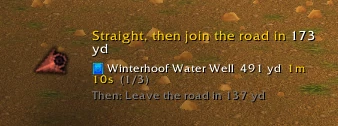
A little window with an arrow pointing along your route, for when you'd rather not stare at the map.
Reading the arrow#
- Colors: green means you're on course, white means a turn's coming up, and red means the route's behind you.
- The next step: what to do now and the next turn ("Continue straight, then slight right in 13 yd", "Board the zeppelin to Orgrimmar"), plus the road you're heading toward.
- Hearthstone or teleport first: when the route starts with one, the window says so ("Use your Hearthstone", and where it takes you), with its button glowing where the arrow usually is. Click it right there to use it, same as the button in the map's directions. After that it talks you through the walk.
- Stairs: in the capitals, Undercity and dungeons, stairs and ramps between levels get a step of their own, with the turn right after them: "Stairs up in 10 yd, then turn left". The bends of a spiral stair don't get called out as turns.
- The stop: how far it is and your ETA.
Make the window taller to see your later stops listed too.
Settings#
Once it's locked, clicks pass right through it (the hearthstone button still works). Options → Directions turns the window on or off, locks it, and sets its background. /agps arrow on|off does the same from chat.
In a quest area the window shows the quest's objectives instead; see Quests.