AzerothGPS › While you play
Quests
Your quests on the map, and a one-click route through your whole quest log.
On the map#
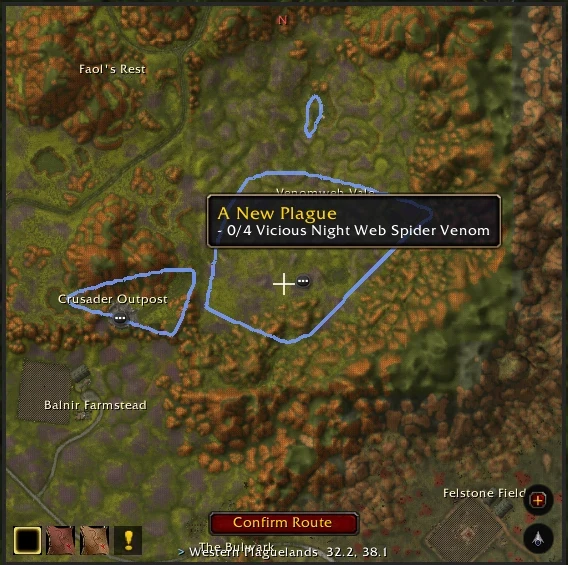
Your quests' objectives and turn-ins show up on the map, with quest areas outlined just like on your minimap. Hover an area to see what you need there.
Quest route#
Hit the Sprint button and it makes a route through your whole quest log in one click: every quest's objectives and every finished quest's turn-in, in the fastest order.
- New quests: pick up a new quest while you're on the route and a Sprint icon pulses in the arrow window. Click it to add that quest.
- Only this zone (Options → Routing): the quest route only takes quests in the zone you're in. Quests in a city route to the city itself (down in Undercity, not up top).
- Group quests: an elite quest, or one that suggests more than one player, asks first whether to keep it in the route (Keep or Leave Out). It asks once per quest until you /reload or log out.
- Done by the quest: a quest's stop is done when its objectives are, wherever you finish them; a turn-in is done when you turn the quest in, not when you walk up to the quest giver. A quest you turn in, finish or drop on the way comes off the route too.
Questing stops#
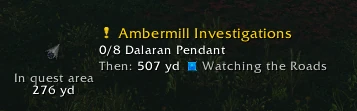
On by default: a stop inside a quest's area is done when that quest's objectives are done, not just when you get there.
- In the area: the arrow window shows the objective counters, and a small arrow still points you to the stop's spot. Once you're there, a big ! takes over and the route waits for you.
- Leaving early: the route leads you back. Finish anywhere in the area and it moves on to the next stop.
- Quests with no area: on the quest route, within 80 yards of the quest's spot counts as being there. Its objectives show, and the route waits at the spot until they're done. A turn-in shows Turn in the quest until you do.
- Passing through: walk through any quest's area (even without a route) and you'll see its objectives. Walk into the area of a stop further down your list and that stop jumps to the front.